Gymnastics Notebook KDP Interior: A Print-Ready Planning Asset for Creators and Educators
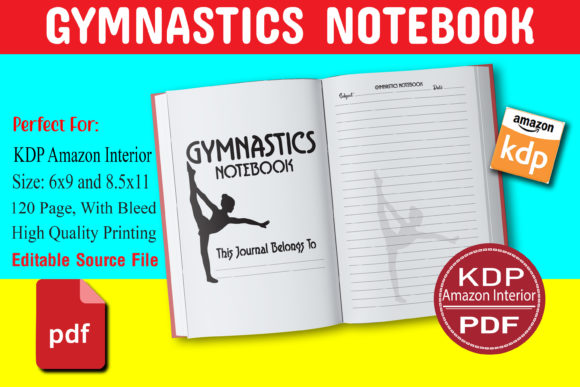
When launching a new journal or planner on Amazon KDP, the interior file isn’t just a design—it’s the functional core of your product. The Gymnastics Notebook KDP Interior is a professionally structured, fully editable 120-page layout built specifically for creators who serve gymnasts, coaches, students, and young athletes—but its utility extends far beyond the gym floor. At its foundation, it’s a high-resolution, print-ready asset that bridges creative intent with production readiness.
This interior comes in two standard KDP dimensions—8.5″ × 11″ and 6″ × 9″—and includes both PDF and EPS files with full bleed. That means no last-minute resizing, no font substitution risks, and no guesswork about margins or trim zones. You receive two PDFs (one for each size) and two corresponding EPS files—vector-based, layered, and editable in Adobe Illustrator. All files are optimized for CMYK printing, meet KDP’s resolution and bleed requirements, and are pre-formatted for fast upload and approval.
Where It Fits in Your Publishing Workflow
The Gymnastics Notebook KDP Interior enters your process at the implementation stage—not ideation, not marketing, but execution. If you’re developing a themed productivity journal for girls aged 8–14, a coach-led training log, or even a hybrid goal-tracking tool for teen athletes balancing school and sport, this interior serves as your production baseline. It eliminates the need to build from scratch in InDesign or Illustrator, saving hours of layout work while preserving full control over customization.
Before uploading, you’ll typically pair this interior with a matching cover (designed separately or sourced from a compatible KDP cover template). During preparation, you’ll verify page count alignment (120 interior pages = 60 physical sheets), confirm bleed settings match KDP’s 0.125″ requirement, and ensure all fonts are outlined or embedded in the EPS files. Because the files are editable, you can insert custom headers, adjust line spacing for younger writers, add coaching prompts on specific pages, or localize content—without breaking print integrity.
How It Integrates With Real-World Use Cases
For educators and youth program coordinators, this interior functions as a ready-made scaffold for skill tracking. Each lined page supports daily reflection, weekly goals, or routine habit-building—especially valuable when paired with structured programs like USA Gymnastics’ “Level-Up” progression system. Coaches can use the consistent layout to assign weekly beam drills, bar transitions, or flexibility goals—and students record reps, notes, and self-assessments without visual clutter.
Freelance designers and KDP publishers often layer this interior into broader product suites. For example: one creator uses the 6″ × 9″ version as the base for a “Gymnastics Goal Journal” series, then builds companion digital workbooks (PDF checklists, video-linked QR codes) and printable wall charts. Another bundles the 8.5″ × 11″ interior with a teacher’s guide and editable Google Slides lesson plans—creating a cohesive classroom resource package where the notebook anchors hands-on reflection.
Small business owners running gymnastics academies use the editable EPS files to imprint studio branding—adding logos to title pages, inserting contact info on back matter, or embedding seasonal challenges directly into the layout. Because the vector files retain scalability and layer integrity, those edits remain crisp at any output size, whether printed in-house for camp handouts or sent to a local printer for branded swag.
Practical Implementation Tips for Consistent Results
Start by auditing your target audience’s writing needs. The Gymnastics Notebook KDP Interior uses clean, wide-ruled lines—ideal for developing handwriting and note-taking stamina. But if your users include early readers or children with fine motor delays, consider adjusting line height in Illustrator before finalizing. The EPS format makes that feasible: open the file, select the ruling layer, scale uniformly, and re-export as PDF/X-1a.
For long-term usability, pay attention to organization logic. The 120-page count supports a balanced rhythm: front matter (title + instructions), 90+ lined pages for daily use, and back matter (goal summaries, achievement trackers). You can repurpose blank spreads between sections for custom inserts—like a “Flip Progress Chart” or “Beam Confidence Scale”—without disrupting pagination.
Consistency across formats matters. If you’re publishing both sizes, test how key elements translate: does the feather motif (a subtle recurring graphic element in the design) retain clarity at 6″ × 9″? Does the header font remain legible when scaled down? Use KDP’s online previewer to validate both versions—not just for color fidelity, but for spacing and hierarchy.
Compatibility and Quality Control Checks
This interior works seamlessly with standard KDP workflows—but only if prep steps are followed precisely. Always export final PDFs using the “PDF/X-1a:2001” preset in Illustrator or Acrobat. Avoid saving from preview apps or converting via online tools, which strip bleed data or compress images. Run a preflight check in Acrobat Pro: look for missing fonts (none should appear—the EPS ensures outlines), low-res images (not applicable here, as it’s vector-based line art), and incorrect color spaces (CMYK required).
Because the files include bleed, avoid cropping in third-party editors. KDP’s printer will trim 0.125″ off each edge—so critical content must stay within the safe zone (at least 0.25″ from trim). The interior’s layout already respects that; your edits should too.
Why Editable Files Matter Beyond First Launch
An editable interior isn’t just about launch flexibility—it’s about sustainable iteration. As feedback rolls in (“Add more space for vault notes,” “Include monthly reflection prompts”), you can update the source EPS, regenerate the PDFs, and push a new edition in under an hour. No redesign fees. No dependency on external designers. Just direct control over evolution.
That responsiveness supports niche refinement. One publisher started with the standard gymnastics theme, then used the same EPS base to create variants: “Rhythmic Gymnastics Journal” (swapping bars/beam icons for ribbon and hoop motifs), “Tumbling Tracker” (replacing feather graphics with dynamic motion lines), and “Coach’s Daily Log” (adding session-planning grids on every third page). All share the same structural integrity—same margins, same binding compatibility, same KDP compliance—because they originate from the same editable source.
For educators building curriculum-aligned materials, that adaptability means aligning with standards like SHAPE America’s National Physical Education Standards—embedding reflection prompts tied to “applying concepts and strategies to movement,” or self-assessment rubrics for “responsible personal and social behavior.” Those additions live directly in the file, not as overlays or sticky notes.
Final Integration Note: It’s a Tool, Not a Template
Treat the Gymnastics Notebook KDP Interior as a production-grade component—not a passive download. Its value emerges when you treat it as part of your workflow infrastructure: something you inspect, modify, validate, and reuse intentionally. Whether you’re scaling a single journal into a series, supporting a local gymnastics program with customized logs, or building a portfolio of themed planners for creative entrepreneurs, this interior delivers precision, speed, and room to grow—without sacrificing quality or control.
It doesn’t replace strategy. It enables it—cleanly, reliably, and ready for print.